LetterSchool - Learn to Write
Letterschool Enabling LearningEducational
4.4680.00 Reviews
- Version
- 2.6.12
- Installs
- 5.00M
- Age Rating
- Everyone
Screenshots
Our Review of LetterSchool - Learn to Write
 Analysis by Appyee
When a child is ready to start making letters but still finds a pencil-and-paper exercise tiring, a tracing game can be a gentle first step. I see LetterSchool - Learn to Write as most useful when an adult wants to turn a short practice session into something a young learner will willingly try. It is an educational game from Letterschool Enabling Learning, built around early writing rather than broad lessons across many school subjects.
What a short session can realistically do
Letter tracing rewards repetition, but repetition can quickly feel like a chore. Here, a child follows letter and number shapes with a finger and sees animations respond along the way. That feedback gives a small, immediate reason to continue. I would treat it as a way to make a few minutes of practice more inviting, not as a replacement for holding a pencil, drawing freely, or learning with an adult.
The distinction matters because tracing on a screen and writing on paper are related but not identical activities. A finger can move easily across glass, while a pencil asks for grip, pressure, and control. I’d use the game to introduce the direction and shape of a character, then occasionally invite the child to try the same one on paper. That simple handoff makes the app part of a learning routine instead of the whole routine.
Speed expectations and the best rhythm
I wouldn’t choose this game expecting a fast, intensive lesson or a system that moves every child forward on a fixed timetable. Its appeal is the small loop: choose a character, trace it, enjoy the response, and decide whether to continue. That makes it easier to fit between other activities than a long, structured teaching session, especially for a preschooler whose attention comes and goes.
A practical approach is to stop while the child is still enjoying the task. If a letter takes several tries, that is a reason to slow down, not to push through a long sequence. An adult can ask the child to name the character or spot it on a book cover afterward; that brings the practice into everyday life without turning the game into a test.
In a typical morning, for example, I might offer a brief turn before getting ready, then revisit one of the shapes with crayons later. The game can provide an engaging starting point, while the paper activity shows whether the child can carry the movement beyond the screen. Keeping the two activities separate also helps avoid the assumption that successful tracing automatically means independent handwriting.
Engaging Learning Experience
Right off the bat, LetterSchool impresses with its vibrant graphics and captivating animations. The app is tailored for preschoolers, helping them to master the alphabet and numbers through interactive gameplay. As soon as I opened the app, I was greeted with a colorful interface that’s both inviting and intuitive. It's like a playground for the mind, where learning feels like play.
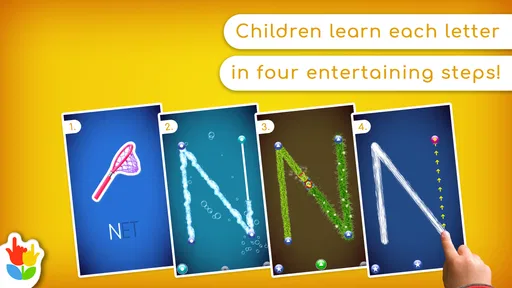
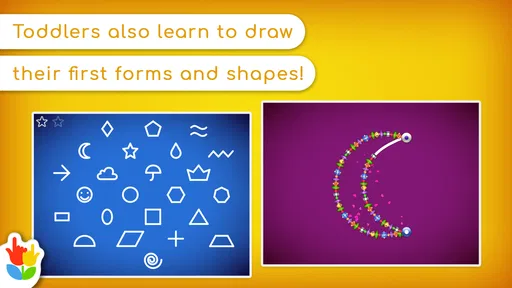
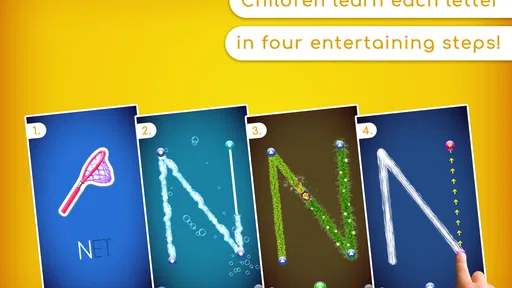
Each letter and number is a mini-adventure. Kids trace the outlines with their fingers, and as they do, delightful animations come to life. Tracing an "A" might turn it into an apple, while a "3" could transform into three little monkeys. It's these little touches that keep children engaged and eager to learn more.
Adaptive Learning Techniques
The app doesn’t just stop at tracing. It incorporates a multi-sensory approach that includes visual, auditory, and kinesthetic learning. This means kids can see the letter, hear its sound, and physically interact with it. This combination is highly effective in reinforcing memory and understanding.
What I found particularly impressive is how the app adapts to a child's learning pace. If your child struggles with a particular letter or number, LetterSchool offers more practice opportunities, ensuring they master it before moving on. This personalized touch helps build confidence and encourages a positive learning experience.
Using it alongside a grown-up
A helpful way to get more from tracing is to sit nearby for the first few turns. Rather than taking over the screen, I’d let the child guide the activity and use simple prompts: “Where does this line start?” or “Can you find this shape in your name?” Those questions encourage attention to form without making each attempt feel like a correction. If the child becomes frustrated, switching to a familiar letter or ending the session is more useful than insisting on finishing a set.
This also gives caregivers a chance to notice what the game alone cannot tell them: whether a child understands the shape, is simply following a bright animation, or needs a larger surface and a chunky crayon to practice the movement. The screen can be motivating, but the adult’s observation is what helps decide what to do next.
User-Friendly Design
One of the standout features of the app is its user-friendly design. Even if your child is not tech-savvy, they can easily navigate through the app. The interface is clean, with large buttons and clear instructions, ensuring that kids can focus on learning without getting frustrated.
The app is also ad-free, which is a huge plus. There are no distractions, just pure learning fun. Parents can rest easy knowing their children won't accidentally click on something they shouldn't.
Heavy-use moments and interruptions
When a child wants to repeat the same tracing activity several times, the main practical question is whether the device remains comfortable to use and whether the session stays focused. I’d keep the screen steady and within easy reach, since repeated finger movement on a small or awkwardly held device can become tiring. A tablet can feel more spacious for tracing, while a phone is easier to bring along; the better choice depends on the child’s hand size and how much room they need.
Young children are also likely to tap around or switch attention abruptly. I recommend keeping the session short and staying close enough to help them return to the activity if they drift away. That is a more realistic expectation than assuming a preschooler will complete a long practice block independently. If the device is interrupted, simply returning to a familiar character is a low-pressure way to restart rather than trying to recreate a precise lesson plan.
Reliability and everyday fit
LetterSchool is a focused game, so I’d judge its reliability by whether it suits the routine you want: quick tracing practice at home, a quiet activity while an adult is nearby, or a small supplement after a child has encountered letters elsewhere. I would not make it the only way a child meets the alphabet. Books, conversations, blocks, drawing, and real writing materials provide different kinds of practice that a screen cannot replace.
The game is free to install, and it has a 4.1 average from around 15,000 ratings, with more than five million installs. Those figures suggest that many families have tried it, but they cannot tell me whether its teaching approach fits a particular child. I’d use a short first session to see whether the tracing interaction holds that child’s attention before building it into a routine.
Comprehensive Content
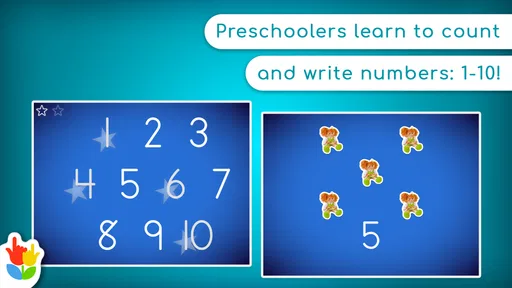
LetterSchool covers both uppercase and lowercase letters, numbers from 1 to 10, and even some basic words. This comprehensive content ensures that kids are well-prepared for kindergarten and beyond. It’s like having a personal tutor at your fingertips.
The app also offers a variety of levels, from easy to more challenging tasks, keeping the content fresh and engaging. This ensures that kids remain motivated and eager to come back for more.
Who will benefit, and who may prefer another approach?
I’d recommend it to families looking for a child-friendly introduction to letter shapes, especially when a young learner responds well to colorful, hands-on screen activities. It may also suit a caregiver or teacher who wants a short, repeatable tracing exercise to sit alongside books and paper work. Its narrow focus can be a strength: a child who needs practice with basic forms does not have to navigate a full curriculum to reach that activity.
On the other hand, I’d look elsewhere if the goal is a broad literacy program, detailed instruction in handwriting technique, or a substitute for adult guidance. A paper workbook may be better for building pencil control, while a story-focused learning app may fit a child who is more motivated by listening and vocabulary than by tracing. The right alternative depends on what the child is practicing, not on which option has the most animation.
One useful trade-off is that a game can make repetition feel lighter, but its rewards can also become the child’s main focus. I’d occasionally ask them to trace slowly and notice where a stroke begins, rather than racing toward the next animation. If they only want to tap through the visual payoff, it may be time to pause and return to the shape with a finger in the air or a crayon on paper.
Parental Insights and Progress Tracking
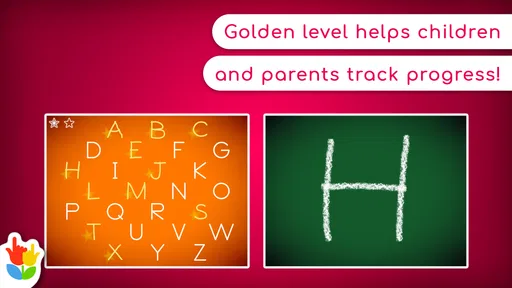
For parents, the app provides insightful progress reports. You can track your child’s development and see which areas they excel in and where they might need a little extra help. This feature is invaluable for tailoring the learning experience to each child's unique needs.
Additionally, the app allows for multiple profiles, which is ideal if you have more than one child using the app. Each child can have their own account, and their progress is individually tracked.
Device constraints and cost
The game is rated for Everyone and requires Android 5.0 or later on Android devices. Its current version is 2.6.5. I would still check that the device is comfortable for a child to hold or reach, since tracing asks for repeated, controlled movement; a device that feels cramped can make an otherwise simple activity frustrating. I can’t infer a particular device’s speed or stability from those compatibility details, so the sensible test is to try a brief session on the device you plan to use.
There are in-app purchases, with listed items ranging from $2.99 to $59.99. That is worth considering before handing the device over: a free install does not mean every available option is included at no cost. I’d have an adult handle any purchase decisions and decide in advance whether the basic experience is enough for the child’s needs.
For families comparing it with other early-learning choices, the key difference is the emphasis on tracing rather than open-ended drawing or a wide mix of lessons. That focus makes it easy to understand what a session is for, but it also means it will not cover every part of early literacy. Pairing it with real-world reading and writing is not an optional extra if the aim is balanced practice; it is what gives the screen activity context.
Final Thoughts
In a world where educational tools are constantly evolving, LetterSchool - Learn to Write stands out as a stellar choice for early learners. Its engaging content, adaptive learning techniques, and user-friendly design make it a winner in my book. While it mainly focuses on letters and numbers, the foundational skills it teaches are essential stepping stones for future learning.
Whether you're a parent looking to give your child a head start or a teacher searching for a classroom supplement, this app is well worth considering. So go ahead, download it, and watch your little learner flourish!
My performance verdict
I see this as a modest, focused learning game rather than an app that needs to carry a child’s whole education. Its design is aimed at short interactions, and that is where I would use it: a few purposeful traces, a pause, then another kind of practice away from the screen. The best test is not how long a child stays in the game, but whether they leave more willing to notice and try letter shapes elsewhere.
For a free starting point, LetterSchool is easy to consider, especially if tracing itself is the skill you want to introduce. I’d keep expectations specific, supervise purchases, and balance touch-screen practice with paper, conversation, and books. If a child enjoys that combination, this game can earn a useful place in the routine; if the tracing interaction feels like work, a different activity may be a better fit.
Verdict
Strengths of LetterSchool - Learn to Write
- Engaging animations enhance learning.
- Multiple languages support diverse learners.
- Customizable settings for skill levels.
- Positive reinforcement encourages kids.
- No ads ensure a safe environment.
Limitations of LetterSchool - Learn to Write
- Limited free content without purchase.
- Requires internet for additional features.
- Repetitive tasks may bore older kids.
- Lacks advanced writing challenges.
- No parental control features included.
Similar Picks in This Category
View All
Little Panda Policeman
BabyBus4.0

Monster Trucks Game for Kids 2
Raz Games4.1

Little Panda's Chinese Recipes
BabyBus4.4

Little Panda's Restaurant
BabyBus4.4

Little Panda's Ice Cream Games
BabyBus4.3

Baby Panda Care
BabyBus3.8
Frequently Asked Questions
What age group is LetterSchool - Learn to Write suitable for?
LetterSchool is designed for young children, typically aged 3 to 7 years old. The app provides an engaging learning experience for preschoolers and early elementary school students, focusing on teaching them how to write letters and numbers through fun and interactive activities. It's a great tool for parents and educators looking to enhance early literacy skills.
Does LetterSchool require an internet connection to work?
No, LetterSchool does not require an internet connection for core functionalities. Once downloaded, all educational content is accessible offline. This makes it a convenient option for parents who want their children to continue learning on-the-go or in places where internet access may be limited.
Are there in-app purchases in LetterSchool?
Yes, LetterSchool offers in-app purchases. While the app provides a range of free content, additional features and levels can be unlocked through purchases. This allows users to access more extensive learning material and advanced levels, enhancing the educational experience for children who progress quickly.
Is LetterSchool available for both Android and iOS devices?
Yes, LetterSchool is available for both Android and iOS devices. Parents can download the app from Google Play Store for Android and the Apple App Store for iOS. This cross-platform availability ensures a wide range of users can access the app, regardless of their device preference.
How does LetterSchool engage children in learning to write?
LetterSchool uses a combination of animations, sounds, and interactive tracing activities to engage children in learning to write. The app employs a gamified approach, where children earn stars and rewards for completing tasks, motivating them to continue practicing. This playful method helps maintain their interest and encourages repetitive learning, crucial for skill development.
Play our best games!


